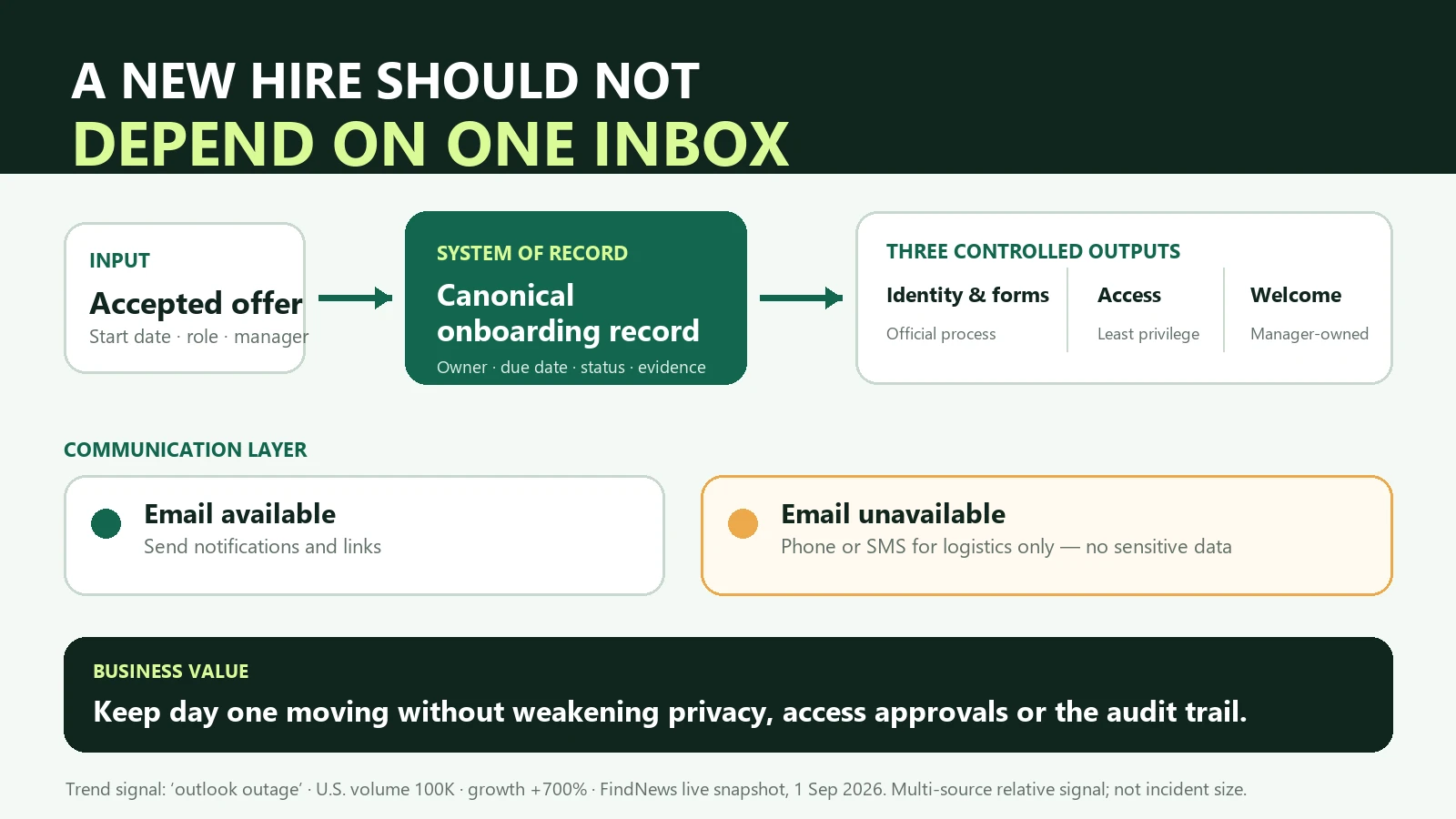
If email is unavailable on a new hire’s first day, continue only the work that can be completed from an approved onboarding record without weakening privacy, identity verification, or access approval. Use phone or SMS to coordinate time and location, not to exchange identity documents, passwords, or sensitive employee data. Delay a controlled task if its secure path is unavailable. A dependable onboarding process treats email as a notification channel, not as the place where the process itself lives.
This distinction became timely on September 1. In its U.S. live snapshot, FindNews listed the query “outlook outage” with a volume value of 100,000 and growth of 700 percent. FindNews describes its index as a multi-source relative trend signal. The figures therefore show a sudden increase in search attention; they do not establish the size, cause, duration, or business impact of any Microsoft incident. The correct source for a tenant-specific service issue is Microsoft 365 Service health.
The trend still exposes a useful operating question. Many small employers build onboarding around one email thread: the offer, forms, account invitations, orientation calendar, manager instructions, and proof of completion all arrive through the same inbox. When that inbox is unavailable, the team discovers that it has not lost only a communication tool. It has lost the informal system of record it never meant to create.
A composite case: the new employee arrives, but the inbox does not
Consider a fictional 18-person bookkeeping firm hiring a remote client coordinator. The offer was accepted on Friday, and the employee starts Monday. The office manager prepared a welcome email containing a calendar invitation, a link to the company handbook, instructions for employment-verification paperwork, and invitations to the client portal and shared drive. The manager assumes that sending the message means the work has been organized.
On Monday morning, the employee cannot sign in. The manager cannot tell whether the mailbox is still being provisioned, whether the password is wrong, or whether a broader service issue exists. The first instinct is to move everything to the employee’s personal email and ask a coworker to share a folder temporarily. That response would make the first day move faster, but it would also blend logistics, identity information, credentials, and access approval into channels that were never designed to hold them.
The better response begins with the employer’s canonical onboarding record. It shows that the start date and role were confirmed, the manager owns the welcome agenda, the office manager owns the employment-verification step, and the systems administrator owns access. It also shows which tasks require the employee’s company identity and which do not. The manager can conduct the welcome call, explain the first-week outcomes, introduce the team, and review a training scenario without waiting for email. The office manager can explain when and where the secure form process will resume. The administrator can diagnose service health and provisioning without granting broad access through someone else’s account.
This case is deliberately composite rather than a client screenshot or claimed result. It proves a control principle, not a performance claim: when ownership and evidence exist outside the inbox, a communication failure remains a bounded exception instead of becoming an improvised onboarding system.
The inbox is a delivery mechanism, not the source of truth
Email is convenient because it combines instructions, links, timestamps, and conversation. Those features make it feel like a workflow. It is not. A workflow needs a defined trigger, current inputs, named owners, explicit decision rights, observable status, and a recoverable record. An email thread may contain some of those elements, but it rarely enforces them.
The accepted offer should trigger a controlled record containing the legal name needed for employment records, preferred name for everyday use, start date, role, manager, work location, required systems, and task owners. The record should point to approved documents; it should not duplicate sensitive files into every notification. Email can tell an owner that a task is ready. If email fails, the task and its evidence still exist.
This architecture also makes automation safer. A system can create the onboarding record, calculate due dates, prepare role-based access requests, and draft reminders. It does not need authority to invent permissions, choose an employee’s identity documents, or move confidential material to a personal channel. The automation prepares and routes; an accountable person approves consequential actions.
Continuity must not become a permission shortcut
An unavailable mailbox creates pressure to “get the employee working.” That pressure often leads to excessive access: borrowing a colleague’s sign-in, using a shared administrator account, or copying an entire client folder because the correct group has not been provisioned. Each workaround converts a short availability problem into a confidentiality and accountability problem.
The safer rule is role-based and minimum necessary. The new hire receives only the systems and records required for the first approved tasks. A named owner approves each exception. If the normal identity or approval mechanism is not available, privileged access waits. The employee can still complete useful work through manager-led orientation, process training with sanitized examples, policy review, and clarification of 30-day outcomes.
This is where the book’s 30–60–90 outcome model matters. Day one is not successful because every account is active. It is successful when the employee understands the role, knows who owns the next decision, can begin safe work, and can see what will happen when the blocked system returns. Access is an enabler of outcomes, not a substitute for them.
A bilingual process still needs one authoritative compliance path
For U.S. employers onboarding Spanish-speaking employees, an outage can expose a second failure mode: the team sends whatever translated form is easiest to reach. USCIS instructions draw a specific line. Employers in the United States outside Puerto Rico must complete the English-language Form I-9. The Spanish-language form and instructions may be used as a translation tool; employers in Puerto Rico may complete the Spanish version.
The practical design is not “English only.” A bilingual employer can explain the process in Spanish, provide the Spanish instructions as a translation aid, identify a preparer or translator when appropriate, and keep the manager’s orientation understandable. The authoritative record still follows the official USCIS rule. An outage is not a reason to download an old copy from an email attachment, ask for a particular document, or route identity evidence through a personal inbox.
USCIS also states that the employee completes Section 1 no later than the first day of employment, but not before accepting the job offer, while the employer or authorized representative completes Section 2 within three business days after the employee’s first day. Those timing rules should exist in the onboarding record rather than in one person’s memory. Employers should always verify the current form and instructions directly with USCIS; this article is operational guidance, not legal advice.
Alternate communication should carry less data, not the same data elsewhere
Microsoft’s own service-incident mitigation guidance recommends multichannel communication, including phone and SMS, so that an incident-management process does not depend entirely on Exchange. The onboarding equivalent is intentionally narrow. A backup message can confirm that the start is still on, provide a call time, name a contact, and explain that secure tasks will resume through the approved system. It should not recreate the entire onboarding packet in an unmanaged channel.
This “logistics only” boundary is valuable because alternate channels have different security, retention, and access characteristics. A personal text message may be appropriate for “join the welcome call at 9:30.” It is not the place for a Social Security number, identity-document image, temporary password, client list, or manager approval. Continuity works by preserving the essential outcome with the least additional exposure.
Measure readiness and recovery, not sent messages
A team that counts sent invitations can report a perfect onboarding even when the employee cannot use the tools. Better evidence asks whether each required system was confirmed before the task that depends on it, whether every blocked task had a named owner, and whether the employee knew the approved fallback. The exception record should capture when the disruption was detected, which work was paused, which alternate communication was used, who approved any deviation, and when normal service resumed.
After recovery, the team should reconcile the canonical record with the systems that changed. Confirm that no duplicate account, broad temporary permission, or orphaned invitation remains. Record the final state, not just the restoration notice. NIST describes contingency planning as a coordinated strategy of plans, procedures, and technical measures that enables recovery after a disruption, including short-term alternate manual processing. For a small employer, the same idea can be implemented with a short, tested exception path rather than an enterprise-scale program.
A 20-minute tabletop test reveals the hidden dependency
Before the next hire, the manager, operations owner, and access administrator can walk through one scenario: email becomes unavailable thirty minutes before the start time. They should locate the onboarding record without using the affected mailbox, identify every task that can proceed safely, name the task that must wait, and contact the employee through the approved backup method. The exercise ends only after they explain how evidence will be reconciled when service returns.
The useful discovery is usually not a technical outage plan. It is a missing operating decision. Perhaps nobody owns the first-day agenda without a calendar invitation. Perhaps the secure form link exists only in a saved email template. Perhaps IT knows the required access but the manager has never approved it. Perhaps the employee’s backup number was collected but is not available to the person leading the first day. Each gap can be repaired before it becomes a live improvisation.
The practical rule: design onboarding so the employee can understand the role, meet the team, and begin safe work even when the primary inbox is unavailable. Preserve privacy and approval boundaries; recover the full record when service returns.
Frequently asked questions
What should an employer do if email is unavailable on a new hire’s first day?
Continue from a secured onboarding record with named owners and due dates. Use an alternate channel only for logistics, preserve normal identity and access controls, and record the exception so the final state can be reconciled after recovery.
Should onboarding documents be sent to a personal email during an outage?
Sensitive identity documents, credentials, and approvals should not be moved to a personal inbox merely because the normal channel is unavailable. Use the employer’s approved secure process or defer that task until the process is available.
Can employers outside Puerto Rico complete the Spanish Form I-9?
USCIS instructions say employers in the United States outside Puerto Rico must complete the English-language Form I-9. The Spanish form and instructions may be used as a translation tool. Employers located in Puerto Rico may complete the Spanish version.
What can onboarding automation safely do during an outage?
It can preserve the canonical record, calculate due dates, identify blocked tasks, prepare messages, and route exceptions. It should not bypass identity controls, grant unapproved access, select documents for an employee, or move confidential data to an unmanaged channel.
Sources and methodology
The topic was selected from a FindNews U.S. live trend snapshot captured September 1, 2026 at 23:13 China Standard Time. The query “outlook outage” showed a volume value of 100,000 and growth of 700 percent. FindNews states that its heat index is a multi-source relative value, so the signal is used only to identify sudden search attention. It is not presented as Microsoft telemetry, incident scope, or affected-user count. Microsoft documentation supplies the authoritative service-health and multichannel continuity guidance. NIST supplies the contingency-planning definition. USCIS supplies the Form I-9 timing and language rules.
- FindNews: global search-trend snapshot, accessed September 1, 2026.
- Microsoft Learn: How to check Microsoft 365 service health, updated and accessed September 2, 2026.
- Microsoft Learn: Microsoft 365 service-incident mitigation strategies, accessed September 2, 2026.
- NIST CSRC: Contingency planning, accessed September 2, 2026.
- USCIS: Instructions for Form I-9, accessed September 2, 2026.