A practical shadow AI policy starts with an owned inventory: tool, user, business task, data involved, action authority, account type, decision and review date. Then classify each use as approved, restricted or stopped—and provide a workable approved alternative. A ban without an alternative often moves the same work out of sight.
Why shadow AI became an immediate operating issue
On September 7, 2026, the UK National Cyber Security Centre defined shadow AI as AI technology used outside an organisation’s approved systems and processes. The NCSC’s central warning is operational: policies have not always developed as quickly as employees’ use of new tools, and unknown use is difficult to manage.
The issue is not evidence that employees are acting maliciously. The NCSC’s broader shadow IT guidance says unofficial tools commonly appear when approved processes are missing, slow or unable to complete the task. Treating every use as misconduct can hide the demand signal the business needs to see.
A Microsoft-commissioned UK survey gives useful—but limited—scale. In October 2025, 71% of 2,003 UK employees surveyed said they had used unapproved consumer AI tools at work. That is not a worldwide small-business rate. It is evidence from one country and sample that undisclosed use can be material enough to investigate.
Conclusion: inventory the workflow, not just the app name
A list containing “ChatGPT,” “Gemini” or “meeting assistant” is not enough. The same tool can support a low-risk public-content draft or receive confidential customer records. The business task, data, account and authority determine the practical decision.
NIST’s AI Risk Management Framework Playbook recommends mechanisms to inventory AI systems and assign responsibility for maintaining that inventory. For a small team, the inventory can begin as a controlled spreadsheet or database. What matters is that the record answers questions someone can act on.
| Inventory field | Question | Why it changes the decision |
|---|---|---|
| Business task | What job is the person trying to finish? | Reveals the unmet workflow need behind the tool. |
| Data introduced | Public, internal, customer, employee, financial or credential data? | Defines exposure and required review. |
| Tool and account | Personal account, free consumer service or approved business tenant? | Changes contractual, retention and administrative control. |
| Action authority | Does it only draft, or can it send, publish, update or pay? | Sets the possible operational consequence. |
| Owner and decision | Who approved, restricted or stopped the use—and when is it reviewed? | Turns an observation into accountable follow-through. |
Conclusion: discover use without designing a surveillance project
Begin with a short, non-punitive workflow review. Ask each role which AI tools or embedded AI features they use, which task each one helps complete, and what information they provide. Reconcile that answer with business subscriptions, approved OAuth connections and company-managed browser extensions where those records are legitimately available.
The objective is not to reconstruct every prompt. It is to identify meaningful data and action paths. A team member who says “I use a personal assistant because the approved template takes 20 minutes” has disclosed both a risk and a process-design opportunity.
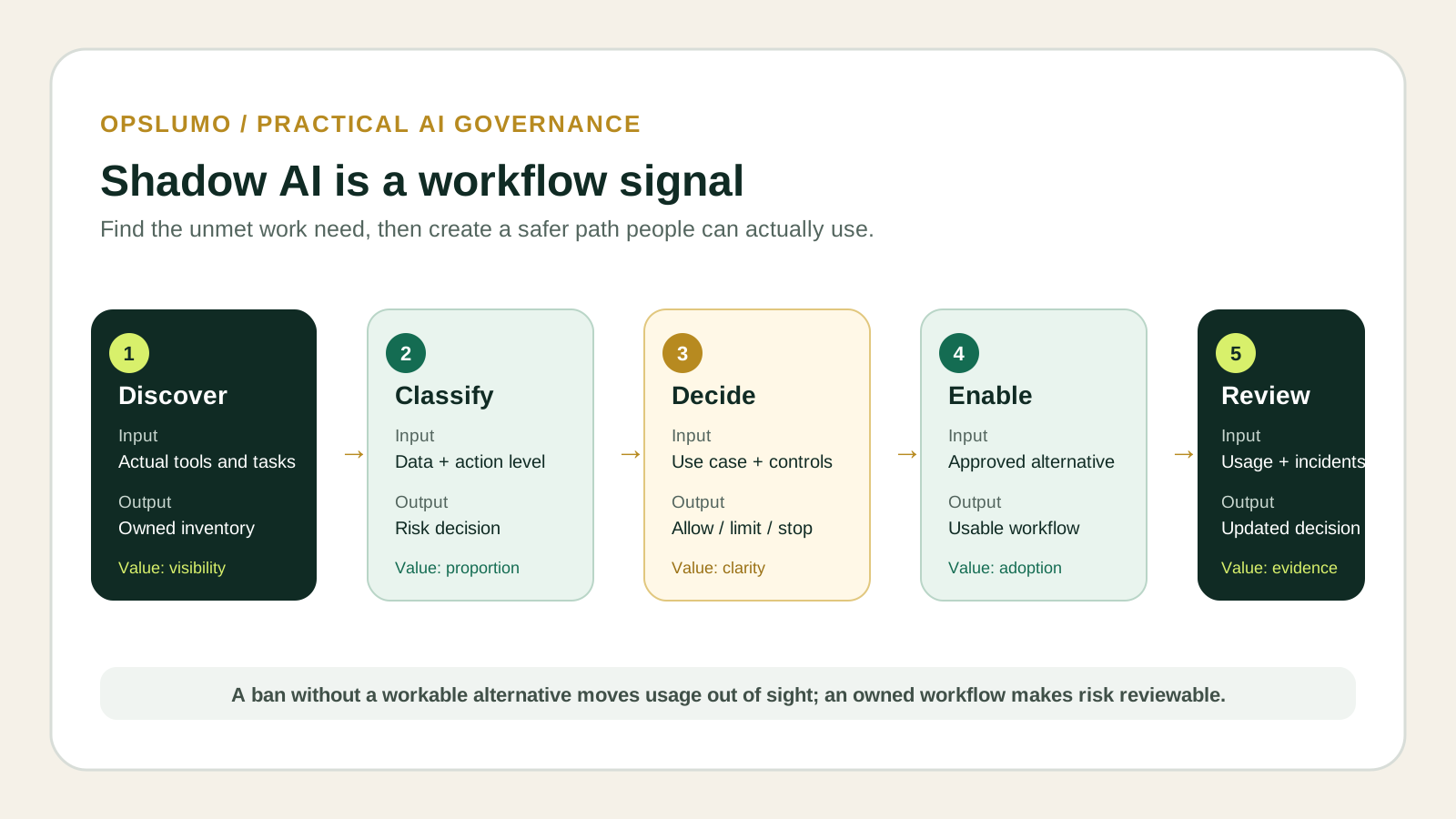
Use three decisions employees can understand
“Allowed” and “banned” are often too coarse. A small team can use three operational outcomes:
- Approved: the stated task, account and data boundary are acceptable; instructions name what must remain outside the tool.
- Restricted: the task is useful, but only through a business account, limited data, human review or a narrower integration.
- Stopped or replaced: the data, authority or vendor conditions exceed the organisation’s tolerance; provide a different process where possible.
These are workflow decisions, not universal legal classifications. Regulated data, employment decisions, professional confidentiality and contractual commitments require the appropriate legal, privacy, HR or security specialist.
Illustrative case: an eight-person bookkeeping firm
This example is fictional. A bookkeeping firm asks employees to disclose AI-assisted tasks. The review finds three uses: drafting generic newsletter copy, summarising recorded client meetings through a personal account, and extracting values from uploaded tax documents.
The firm approves public-content drafting with human review. It restricts meeting summaries to an approved business tenant after consent and retention settings are reviewed. It stops uploads of tax documents until a purpose-built workflow with contractual safeguards, access controls and tested deletion is available. The operations manager owns the inventory and reviews it monthly for the first quarter.
The useful outcome is not “three AI tools found.” It is three named workflow decisions, an owner and a replacement path for the work that still has to get done.
A 30-day implementation sequence
- Week 1 — discover: collect tasks, tools, account types, data and action authority.
- Week 2 — decide: assign approved, restricted or stopped status and name an owner.
- Week 3 — enable: publish a short approved-tool list with examples of acceptable and prohibited data.
- Week 4 — verify: check whether the approved path works, record exceptions and schedule the next review.
Measure inventory coverage, unresolved high-impact uses, time to decide an exception and adoption of the approved path. Do not claim success because a policy PDF was distributed.
Frequently asked questions
Should a small business ban all generative AI?
Not by default. The NCSC recommends reducing risk rather than assuming shadow AI can be eliminated. The right decision depends on the task, data, account, action authority and available alternative.
Is an AI tool inventory a security assessment?
No. It is a management record that identifies what needs review. Technical testing, contractual review and legal or regulatory analysis may still be required.
What should be reviewed first?
Prioritise uses involving customer or employee data, credentials, financial records, external communication, publishing, system changes or automated decisions.
The operating rule: do not begin with “Which AI brand should we block?” Begin with “Which work is happening, what does it touch, what can it change, and who owns the decision?”
Where Opslumo fits
Opslumo helps small teams map repetitive work, define inputs and exceptions, and build human-reviewed automation workflows. We do not replace legal, privacy, HR or cybersecurity counsel. For agent-specific access and lifecycle controls, read AI agent security starts with onboarding.
Sources and methodology
This analysis uses a September 7 NCSC publication as the current signal, then grounds the workflow in NCSC and NIST guidance. The Microsoft statistic is reported with its original UK survey scope. The illustrative case is not a client result.