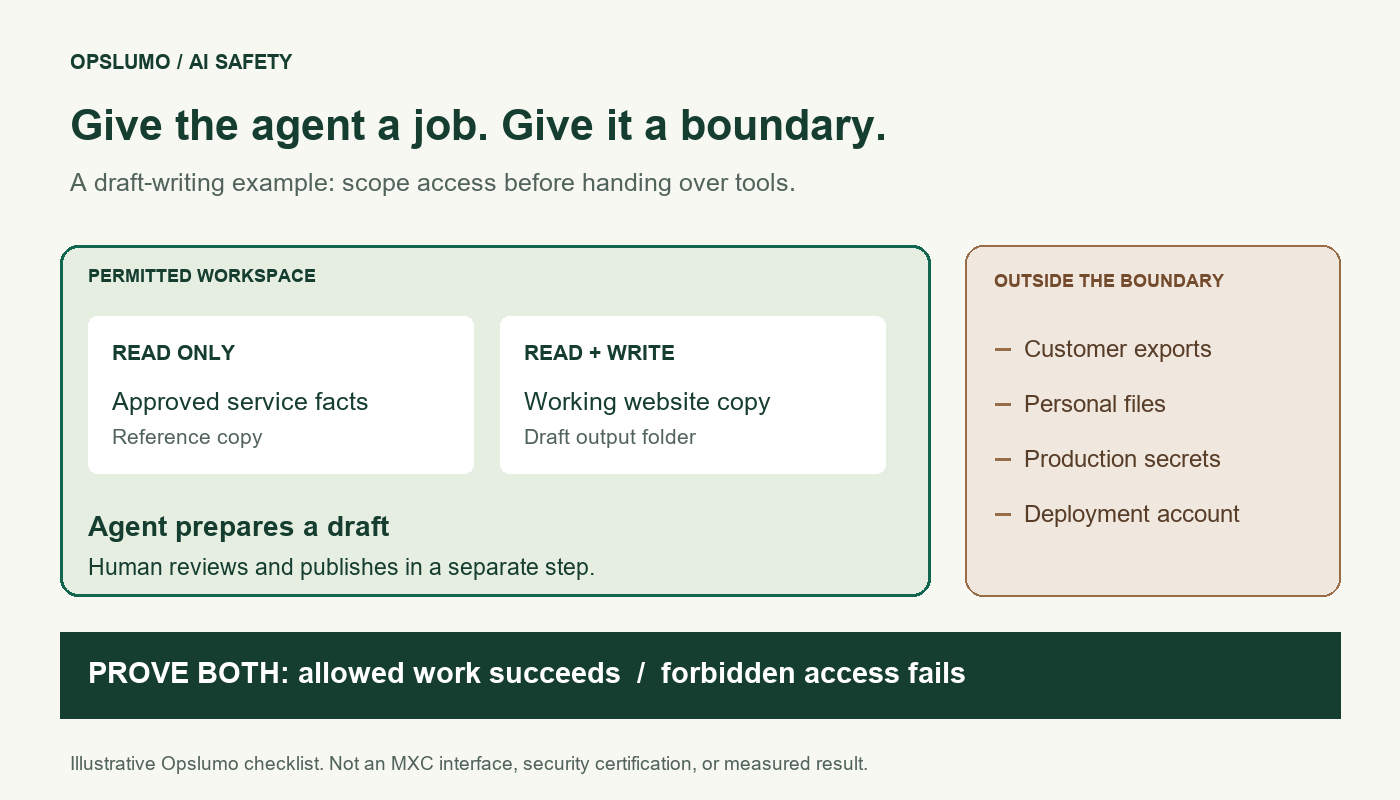
AI agent containment means enforcing limits on an agent's tools and execution environment, outside the model's own instructions. For a small team, the practical question is whether the agent can finish its assigned job while being prevented from reaching unrelated files, credentials, and services.
The phrase is worth learning this week. On October 13, GitHub announced new enforcement controls for enterprise-managed Copilot settings. They address an easily overlooked problem: a team may update its policy while a client is still running with an older one. GitHub's release note says supported clients can be required to fetch current policy at startup and stop if that policy cannot be confirmed. Minimum-version enforcement is also being introduced for the sandbox setting.
You do not need an enterprise rollout to ask the same useful question: which permissions are actually in force on the machine doing the work?
What changed in October?
Microsoft announced general availability of Microsoft Execution Containers (MXC) on October 7. It describes a policy-controlled execution layer that keeps resource permissions outside the agent's control. File, network, and interface access depend on the selected containment backend. Microsoft describes additional Entra identity and Intune management capabilities as forthcoming, so those should not be assumed to be available simply because MXC is generally available.
GitHub's October 7 announcement makes the deployment scope more concrete: local sandboxing is generally available in Copilot CLI, the Copilot app, and VS Code sessions using Agent Host. It separates tool isolation from model execution. Using a different model does not remove the need to restrict the tools acting on its output.
These releases are evidence of available controls, not evidence that your particular workflow is safe. The checks below are Opslumo's suggested acceptance criteria. We have not benchmarked MXC or tested a customer deployment for this article.
Start with one job and three resource lists
Imagine a five-person service business using an agent to prepare draft updates to its website. This is an illustrative scenario, not a customer case study. The agent needs the website copy and current service information. It does not need the owner's entire Documents folder, billing credentials, or permission to publish.
Write down these lists before choosing settings:
- Read only: a reviewed copy of the service catalogue and brand notes. The agent can consult them but cannot change the approved facts.
- Read and write: a dedicated working copy of the website and a draft-output folder. Changes remain reviewable before publication.
- Unavailable: customer exports, payroll files, production secrets, and the deployment account. Keep them out of the test environment rather than relying on a reminder in the prompt.
Handle the network as another resource list. If the job needs no online lookup, ask for a configuration that denies outbound access. If lookup is necessary, identify the destinations and purpose. A browser session already signed into business tools deserves separate review; access to a desktop can carry more authority than the draft-writing job requires.
This builds on our guide to checking permissions before tools act. A good prompt explains the job. An enforced boundary limits what a mistaken or manipulated run can do.
Test a refusal, not just a successful draft
Run the pilot with synthetic files, dummy credentials, and a destination you control. Ask whoever configures the tool to record the active policy, client version, and observed result for each test.
- Allowed work succeeds. Read the approved catalogue and save a draft in the designated folder. Check that the output is useful, not merely that the process exited successfully.
- An unrelated file stays unreadable. Place a harmless test file outside the permitted area. Attempt to read it through the same tool path the agent uses. A written promise not to read it is not a passing result.
- A reference file stays unchanged. Attempt to overwrite a disposable, read-only reference. Compare its contents before and after the attempt.
- An unapproved connection fails. Attempt a request to a controlled test endpoint outside the allowed destinations. Check both the tool outcome and the endpoint's records. Do not send customer data as a test payload.
- A stale policy does not silently win. Restart the client after changing a test permission. Confirm which policy it applies. Where freshness enforcement is supported and enabled, check its documented failure behavior when policy retrieval is unavailable.
Keep failed tests visible. If an agent asks for broader access to finish the draft, review the specific resource it needs. Do not turn an unexplained failure into a blanket permission grant. Retest after meaningful tool or policy changes.
Logging and blocking are different outcomes
Microsoft distinguishes three MXC modes in its technical explanation: Enforcement blocks ungranted access; Learning blocks and records it; Permissive records it but allows it. The activity-report capability described there is Windows-specific. Recording an attempted operation is therefore not proof that the operation was prevented.
For the draft-writing pilot, our recommendation is to validate a blocking configuration against synthetic data first. If a diagnostic run relaxes restrictions, label that run clearly and keep live credentials and customer records out of it. A successful diagnostic run should not be reported as a successful containment test.
What a sandbox still cannot decide for you
An agent can produce an inaccurate price or misleading claim entirely inside its allowed folder. Review the content before it goes public. If a tool is permitted to contact an external service, inspect what it sends; an allowed destination is not permission to disclose every file the agent can read.
Keep publication as a separate step with a named human owner. Record what was approved and retain a recoverable previous version. Our agent control-center guide covers ownership and operating records; the AI agent ROI guide explains how to count review work in the business case.
The useful next step is modest: pick one workflow, write its resource lists, and ask for evidence from the five tests. Broader autonomy can wait until the narrow job behaves as intended.
Sources and scope
- GitHub: Enterprise managed settings enforcement updates, October 13, 2026. Policy freshness and minimum client versions; these are enterprise-managed settings, not universal defaults.
- Microsoft: Microsoft Execution Containers, October 7, 2026. Containment, operating modes, and availability distinctions.
- GitHub: Local sandboxing for GitHub Copilot now generally available, October 7, 2026. Supported experiences and the distinction between models and tool execution.
Sources checked October 14, 2026. The resource lists, example, and acceptance tests are Opslumo's practical recommendations. They are not vendor certification, measured protection rates, or a substitute for checking the behavior of your installed version.